Exact counts
“How many emails from Acme last week?” gets an exact count from Gmail. Cove shows the search it used and lists the newest matches.
Less noise. More space for the work that matters.
Explore Cove ↓Your decisions, meetings, and follow-ups.
A little head start, all in one place.
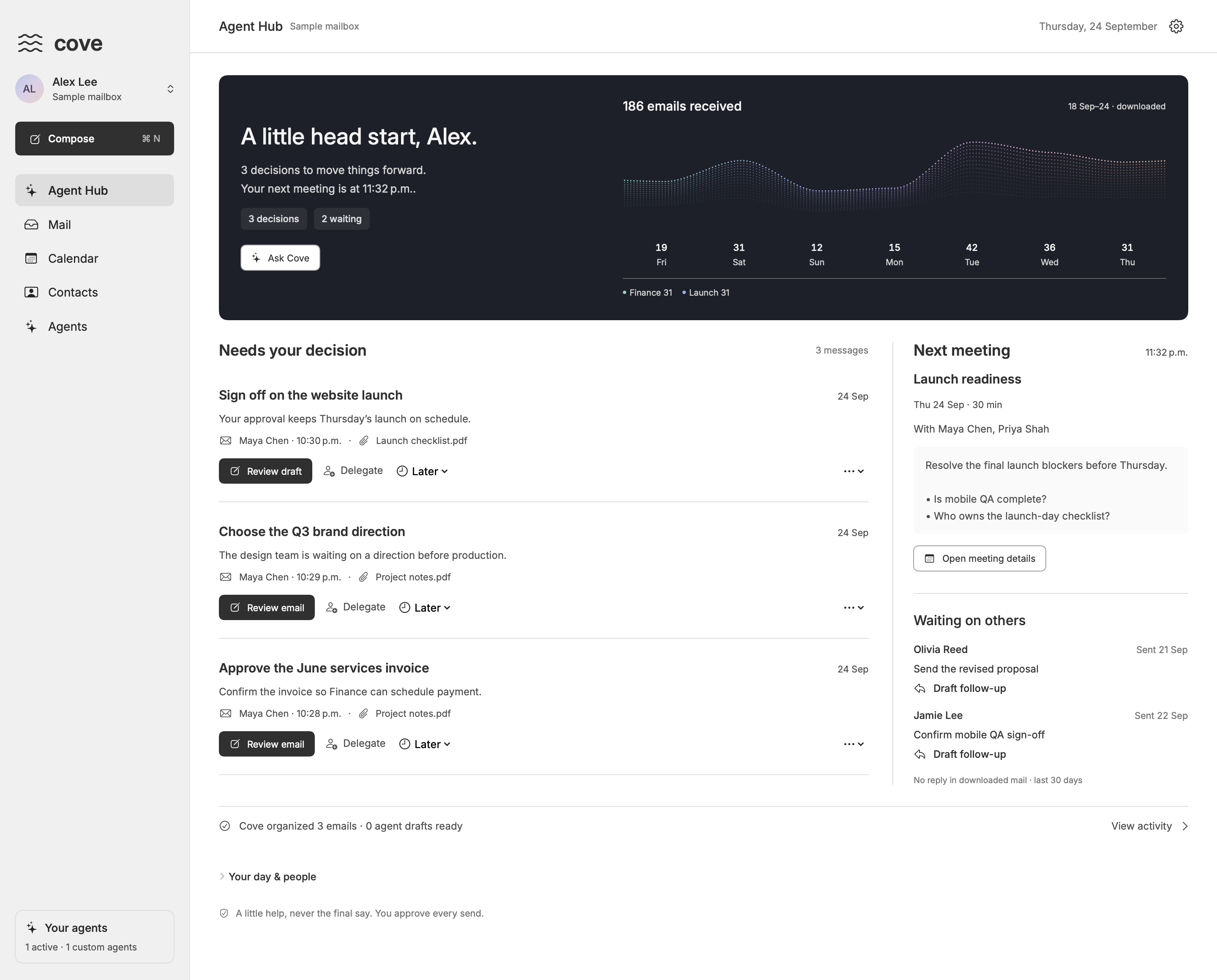
Your tools. A clearer view.
Ask Cove for an event, a draft or something to remember.
It answers with a card you can check, change or undo.
New in Ask Cove
Nothing is added, saved or sent until you choose.
“How many emails from Acme last week?” gets an exact count from Gmail. Cove shows the search it used and lists the newest matches.
Drag on empty space to create an event of that length. Drag an event to move it, even to another day, or drag its bottom edge to resize. Undo is right there, and events with guests ask first.
Jev spots promises and requests in mail you send and read. Approve, and they land in Google Tasks with a link back to the email.
A small ✦ opens Ask Cove right where you’re reading. Ask for a reply and the draft lands in the reply box.
“Archive these” or “label everything from Maya” shows the exact emails first. Nothing changes until you approve, and Undo is there.
Your Inbox splits what needs you from newsletters and notifications. One click teaches it a sender.
One-click Unsubscribe for newsletters, confirmed first. A Spam folder with Not spam and Report spam, and images stay off.
A ✦ above Send rewrites, shortens or fixes the whole draft or just what you selected. You apply it when it reads right.
Connections shows what’s ready and what’s next: your AI account, Jev, Calendar and Tasks, each one click away.
Mail is stored encrypted on your Mac, one record per email. Keys stay in the macOS Keychain, with optional Touch ID.
New in 0.1.52
Give each one a job in a sentence. When new mail fits, it files it, drafts a reply for you to review, or tells you. Nothing is ever sent for you.
No rules to write. Say what you want the way you’d ask an assistant, check the steps, then try it on your recent mail before it runs.
Unclear emails wait in Activity for you. Agents never send, delete or pay.
Private by design
Cove is a Mac app, not a web service. Your mail goes from Gmail to your Mac and stays there, encrypted.
How Cove handles your data →Cove downloads your mail from Gmail and stores it on this Mac, encrypted one email at a time. The keys stay in the macOS Keychain, with optional Touch ID. There’s no Cove server in between.
You sign in through Google in your browser, and Google hands access straight back to Cove on your Mac. Disconnect or revoke it anytime.
Writing and Ask Cove use your own ChatGPT, Claude or API account. Only what a request needs goes to the provider you pick. Jev and agents send email to TypeSafe, and only after you add a key.
Cove works fully on your Mac. Optional cloud sync is off by default. If you turn it on, it copies recent mail to Cove’s servers, and you can remove that copy anytime.
For teams on Google Workspace
Your admin registers Cove in your own Google Cloud project as an internal app, then pastes the Client ID and secret in Cove under Add work account. Sign-in runs on your organization’s client, not Cove’s. Everyone in your Workspace can use it, nothing has to be approved by Google, and your admin can revoke it anytime.
With your own client and cloud sync off, Cove runs no service of its own: just your Mac, Google, and the AI you choose.
Create a Google Cloud project and turn on the Gmail, Calendar and Tasks APIs.
Set the audience to Internal and add the Gmail, Calendar and Tasks permissions.
Create a Desktop app client.
In Cove, choose Add work account and paste the ID and secret.
Less catching up. More moving forward.
Get Cove for Mac macOS 14 or later · Apple silicon & Intel · Beta